SCCM I AM

Ad you

Introduction to Microsoft SCCM 2012

SCCM(System Center Configuration Manager) is Microsoft's software product to manage endpoints(Desktops,Laptops,Tablet,MobilePhones etc.) and widely use by companies from mid size to large enterprises.

Introduction to Microsoft Intune

Intune is Microsoft's MDM(Mobile Device Management) product and its a part of EMS(Enterprise Mobility Suite). Intune can be used as standalone or integrated with SCCM to manage mobile devices.

Introduction to Windows Powershell

Windows Powershell is Microsof't scripting environment comes with Microsoft Operating system. It is widely used scripting language to perform different kind of automation in Windows OS instlaled machines.

Introduction to Microsoft SQL Server

SQL Server is Microsoft Database and widely used a database server in Windows OS installed servers.As a SCCM specialiast, one must know about SQL server from querying database to administration.

Introduction to Windows 10

Windows 10 is Microsoft's latest client operating system and more advance than its previous versions like 8.1,8 and 7. Microsoft introduced lots of features in Windows 10.

Showing posts with label Client Troubleshooting. Show all posts

Saturday, February 7, 2015

Sending with winhttp failed; 80072ee7

I came across below error message during SCCM 2007 R3 client push from server. When I checked the CCMSETUP.log file, I found error message:

"Sending with winhttp failed;8002ee7"


I convert the hexadecimal error code 80072ee7 into decimal and found that decimal error code is 12007(if you properly check the error lines shown in above pic, you can see 'Error at WinHttp SendRequest: 12007') which is "ERROR_INTERNET_NAME_NOT_RESOLVED".

ERROR_INTERNET_NAME_NOT_RESOLVED means there is problem in DNS name resolution

I checked IP address settings in my client. BOOM !!! I found it...Due to misconfiguration in DNS, primary IP address for DNS server was 127.0.0.1. I changed the primary IP address for DNS with actual one. After that change, client starts download the client package from server and installation completed successfully. 
Thats it!
Suggestion: You may find different answers against this error. Don't just apply anything. Try to decode the error and analyse the issue properly so that you can apply correct setting to solve the issue.
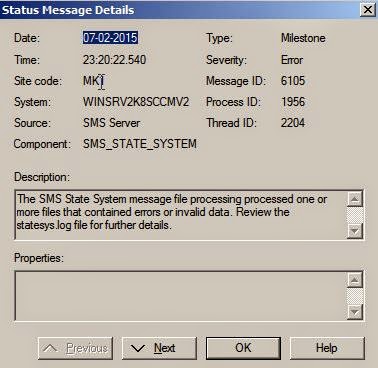
The SMS State System message file processing processed one or more files that contained errors or invalied data

You may encounter below error message in SCCM 2007.

Error:"The SMS State System message file processing processed one or more files that contained errors or invalied data.." in SMS_STATE_SYSTEM


Reason: This means client computer's key is not present in server database. Its may be client record was aged out or deleted manually.Since there is no valid key in the database, Server is not accepting the client's data.

Solution: i) Generate new GUID for the client or ii) Reinstall the client

Wednesday, February 4, 2015

Unable to connect to WMI on remote machine..error = 0x800706ba

Sometimes you may find below error message in CCM.log file (in SCCM server side) during client

push process initiated from server(automatic or manually done by admin):
Error:Unable to connect to WMI on remote machine "MachineName", error = 0x800706ba


Reason:Lets decipher the meaning behind this error. If I convert the error code  0x800706ba to decimal, I get 1722. If I go dipper by checking  " net helpmsg 1722 " , I get the following respons: "THE RPC SERVER IS UNAVAILABLE".

Solution(s):

1. Try to access the ADMIN$ share of the target system using the same account that is used for client push activity from server side. If its through, then you need to go to next step else check whether client push account has local admin access in target system or not.

2. Check DNS name resolution. First ping the target computer. If you get reply with IP address then type "Ping -a <IP Address of target computer>". If it resolves the same name as you expected, then you move to next step else check DNS access.

3. Now check the Windows OS firewall settings. If you find the Firewall feature is turn on please turn it off from Control Panel.